# Collect Writing NFT

{% hint style="warning" %}
The documentation is designed for Liker Land and LikeCoin v2. For information on [3ook.com](https://3ook.com/) and LikeCoin v3, please visit [docs.3ook.com](https://docs.3ook.com) and [dao.like.co](https://dao.like.co/).
{% endhint %}

No matter if you have a crypto wallet or not, collecting Writing NFTs on desktop or mobile is equally convenient:

## Ways to collect Writing NFT

### Credit Card

#### [Collect Writing NFT with a credit card (without a wallet)](#collect-writing-nft-with-a-credit-card-havent-created-any-wallet-for-both-desktop-and-mobile)

Applicable to those who haven't created any wallet, and it works on both desktop and mobile.

#### [Already have a wallet and collect Writing NFT with a credit card](#already-have-a-wallet-and-collect-writing-nft-with-a-credit-card-for-both-desktop-and-mobile)

Applicable to those who have created a wallet. User can use [Email/Social](/depub/register.md), [Keplr](/general-guides/wallet/keplr.md), [Cosmostation](/general-guides/wallet/cosmostation.md), [Leap](/general-guides/wallet/leap.md), [Keplr mobile](/general-guides/wallet/keplr-mobile.md), [Cosmostation app](/general-guides/wallet/cosmostation-app/cosmostation-app-deposit-and-send-likecoin.md) or [LikeCoin app](/general-guides/dapp/liker-land/download.md)...etc to collect Writing NFT via desktop or mobile browser and pay by credit card.

### LikeCoin

#### [Collect Writing NFT by LIKE on desktop](/depub/collect-writing-nft/collect-writing-nft-on-desktop.md)

Users can use [Email/Social](/depub/register.md), [Keplr](/general-guides/wallet/keplr.md), [Cosmostation](/general-guides/wallet/cosmostation.md), [Leap](/general-guides/wallet/leap.md), [Keplr mobile](/general-guides/wallet/keplr-mobile.md), [Cosmostation app](/general-guides/wallet/cosmostation-app/cosmostation-app-deposit-and-send-likecoin.md) or [LikeCoin app](/general-guides/dapp/liker-land/download.md)...etc to collect Writing NFT by LIKE on desktop.

#### [Collect Writing NFT by LIKE on mobile](/depub/collect-writing-nft/collect-writing-nft-on-mobile.md)

Users can collect Writing NFT on a mobile browser by LIKE using [Keplr mobile](/general-guides/wallet/keplr-mobile.md), [Cosmostation app](/general-guides/wallet/cosmostation-app.md) or [LikeCoin app](/general-guides/dapp/liker-land/download.md).

#### [One-Click Collect All Writing NFT](/depub/collect-writing-nft/collect-all.md)

Users can use [Email/Social](/depub/register.md), [Keplr](/general-guides/wallet/keplr.md), [Cosmostation](/general-guides/wallet/cosmostation.md), [Leap](/general-guides/wallet/leap.md), [Keplr mobile](/general-guides/wallet/keplr-mobile.md), [Cosmostation app](/general-guides/wallet/cosmostation-app/cosmostation-app-deposit-and-send-likecoin.md) or [LikeCoin app](/general-guides/dapp/liker-land/download.md)...etc to seamlessly purchase Writing NFTs from the same creator via desktop or mobile browser.

***

## Start Collecting

Go to the [Liker Land Book Store Top Articles](https://liker.land/en/store/articles) or [LikeCoin NFT Dashboard](/depub/tools.md) to check out the NFT that you want to buy, and click "Collect Now" to collect;

<figure><img src="/files/tFM5oTGclKUncIG45pAV" alt=""><figcaption><p>Liker Land  Top Articles</p></figcaption></figure>

Or go to the NFT details page and click "Collect" or the current NFT price. To better illustrate the relationship between creators and supporters, Liker Land displays the avatar of collectors on the NFT collection page;

<figure><img src="/files/UL0dLoA3xgWub8oc1KHP" alt=""><figcaption><p>NFT Content Details</p></figcaption></figure>

Or else go to the creator's [Bookshelf](/depub/liker-land/bookshelf.md) (website: <https://liker.land/\\[wallet> address] ) and click the current NFT price or "[Collect All](/depub/collect-writing-nft/collect-all.md)";

<figure><img src="/files/q8UyHd91hHfmxt9MeSJQ" alt=""><figcaption><p>Bookshelf</p></figcaption></figure>

Also can click "Collect Now" on [NFT Widget](/depub/collect-writing-nft/nft-widget.md);

<figure><img src="/files/QHbP1wDtg0u2LXdOP0Dr" alt=""><figcaption><p>NFT Widget</p></figcaption></figure>

and start to collect Writing NFT.

***

## Collect Writing NFT with a credit card ( Haven't created any wallet, for both desktop and mobile )

You can pay by credit card to purchase Writing NFT, and create a wallet to receive NFT after completing the purchase, which is simple and convenient.

### Step 1: Pay by Credit Card&#x20;

Click on the Writing NFT price or the collect button on browser and the Collect NFT page pops up. "Leave a message to creator" and enter the message if you want to do so, or just click "Pay by card".

<figure><img src="/files/3o7Kw2rrWVwxHV00C09B" alt=""><figcaption><p>Choose to Pay by card on the collection NFT page</p></figcaption></figure>

The Stripe page will appear. Enter your email and credit card information, then click "Pay". The purchase price of the Writing NFT in fiat currency is calculated based on the market price, exchange fee, and credit card handling fee.

<figure><img src="/files/8zvGp6aBLGm9WvLS8C0t" alt=""><figcaption><p>Enter your information on the Stripe payment page</p></figcaption></figure>

Payment Authentication page pop-up, enter your OTP code and press "VERIFY".

<figure><img src="/files/i1LD5zIZkrPdAZcW4jwR" alt=""><figcaption><p>Credit Card OTP Authentication Page</p></figcaption></figure>

### Step 2: Create an account and verify your email address

At the same time, you will receive an email to claim your Writing NFT. Please follow the instructions to [register a Liker ID through Email/Social](/depub/register.md) and verify your email address. If you have any questions during the process, please contact [Liker Land customer service](https://go.crisp.chat/chat/embed/?website_id=5c009125-5863-4059-ba65-43f177ca33f7).

Learn more about Email/Social login:

{% content-ref url="/pages/-M-KBqzWhsn8cYCROb2j" %}
[Register on Liker Land](/depub/register.md)
{% endcontent-ref %}

<figure><img src="/files/gSyI8c3vySqdQInKlQVZ" alt=""><figcaption><p>Email Instructions to claim Writing NFT</p></figcaption></figure>

### Step 3: Check your NFT Collection

Go to the upper right corner of the [Liker Land website](https://liker.land/en) and click "Login".

<figure><img src="/files/MA7Bx1XaS6iT3CGnLWB2" alt=""><figcaption><p>Click "Login"</p></figcaption></figure>

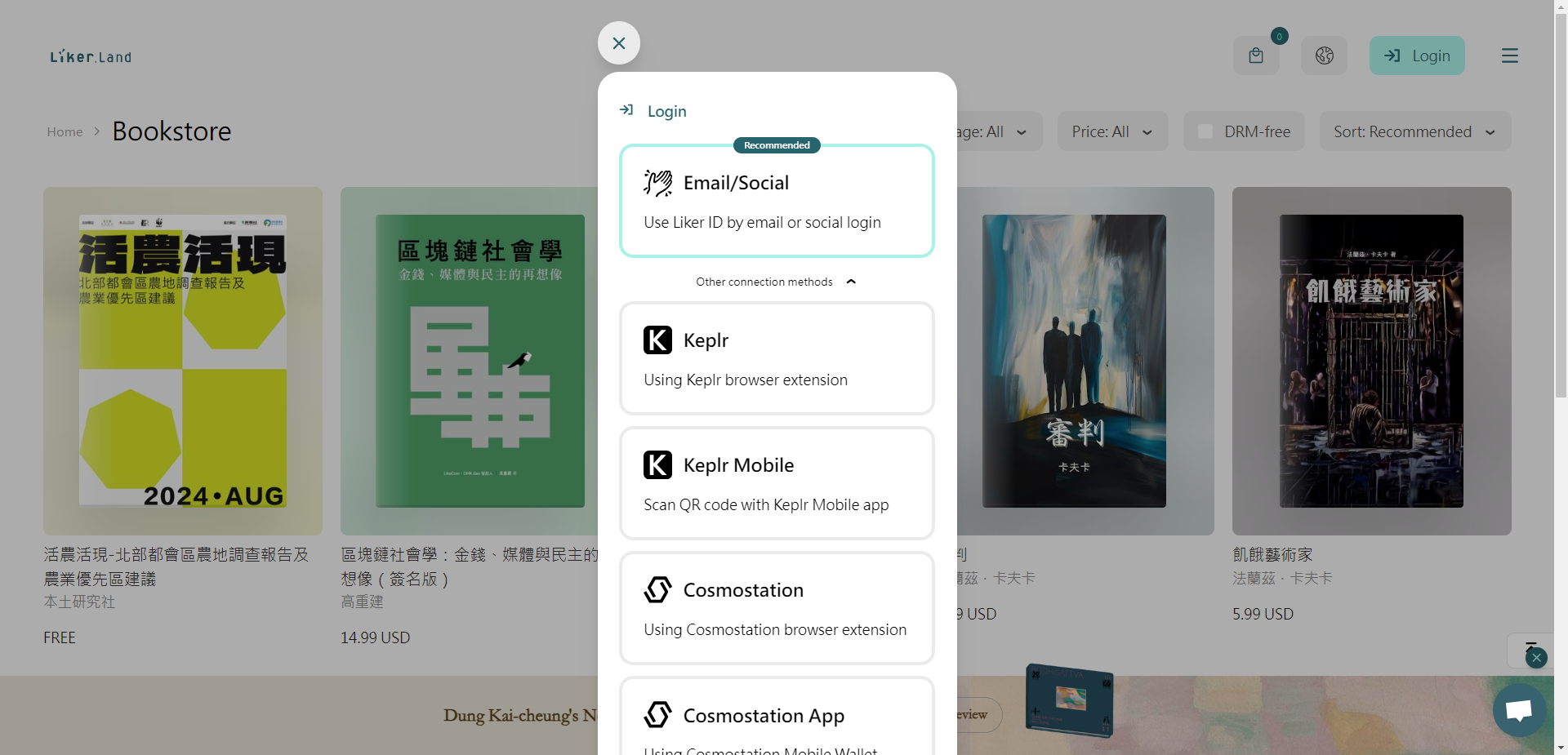
A pop-up window appears, click Email/Social to login to Liker Land.

<figure><img src="/files/knRSehwhqG9DITZjcW1A" alt=""><figcaption><p>Login to Liker Land</p></figcaption></figure>

Go to "[My Bookshelf](/depub/liker-land/bookshelf.md)" via the menu to view the NFT that you've collected.

<figure><img src="/files/Ya0MrtAFViR87EP55m75" alt=""><figcaption><p>View purchased Writing NFTs in My Dashboard</p></figcaption></figure>

***

## Already have a wallet and collect Writing NFT with a credit card (For both desktop and mobile)

Users who have registered with [Email/Social](/depub/register.md), [Cosmostation](/general-guides/wallet/cosmostation.md), [Leap](/general-guides/wallet/leap.md), [Keplr mobile](/general-guides/wallet/keplr-mobile.md), [Cosmostation app](/general-guides/wallet/cosmostation-app.md)...etc can also use a credit card to purchase Writing NFT by selecting the appropriate login method.

### Step 1: Log in to Liker Land

Go to the upper right corner of the [Liker Land website](https://liker.land/en) and click "Login".

<figure><img src="/files/MA7Bx1XaS6iT3CGnLWB2" alt=""><figcaption><p>Click "Login"</p></figcaption></figure>

A pop-up window appears, click Email/Social to login to Liker Land.

<figure><img src="/files/KAS3M5Y3Y0k3Cs3ahRy8" alt=""><figcaption><p>Login to Liker Land</p></figcaption></figure>

### Step 2: Pay by Credit Card&#x20;

Click on the Writing NFT price or the collect button and the Collect NFT page pops up. "Leave a message to creator" and enter the message if you want to do so, or just click "Pay by card".

<figure><img src="/files/dS8QvAZkmjLkh68eMNLI" alt=""><figcaption><p>Choose to Pay by card on the collection NFT page</p></figcaption></figure>

The Stripe page will appear. Enter your email and credit card information, then click "Pay". The purchase price of the Writing NFT in fiat currency is calculated based on the market price, exchange fee, and credit card handling fee.

<figure><img src="/files/vGJcnyoLUf3cqPWgIsGf" alt=""><figcaption><p>Enter your information on the Stripe payment page</p></figcaption></figure>

Payment Authentication page pop-up, enter your OTP code and press "VERIFY".

<figure><img src="/files/ciywjS0bPbv2GI6KAofQ" alt=""><figcaption><p>Credit Card OTP Authentication Page</p></figcaption></figure>

### Step 3: Check your NFT Collection

Payment is successful! appears, the Writing NFT is successfully collected with an animated 3D book cover. Click "View the NFT" to see the details of the NFT purchased or you can go to [My Bookshelf](/depub/liker-land/bookshelf.md) to check out the NFT that you have collected.

<figure><img src="/files/3q9y0pm6FQJn8iUdCAuE" alt=""><figcaption><p>Successfully purchased Writing NFT</p></figcaption></figure>

#### Continue to learn how to:

{% content-ref url="/pages/rrzpQNxwLVcivQCK1fne" %}
[Collect Writing NFT by LIKE on desktop](/depub/collect-writing-nft/collect-writing-nft-on-desktop.md)
{% endcontent-ref %}

{% content-ref url="/pages/WAltpNyt6CKoC4khijO1" %}
[Collect Writing NFT by LIKE on mobile](/depub/collect-writing-nft/collect-writing-nft-on-mobile.md)
{% endcontent-ref %}

{% content-ref url="/pages/DzpKTKfKEyO3KIHdfIVl" %}
[One-Click Collect All Writing NFT](/depub/collect-writing-nft/collect-all.md)
{% endcontent-ref %}


---

# Agent Instructions: Querying This Documentation

If you need additional information that is not directly available in this page, you can query the documentation dynamically by asking a question.

Perform an HTTP GET request on the current page URL with the `ask` query parameter:

```
GET https://docs.v2.like.co/depub/collect-writing-nft.md?ask=<question>
```

The question should be specific, self-contained, and written in natural language.
The response will contain a direct answer to the question and relevant excerpts and sources from the documentation.

Use this mechanism when the answer is not explicitly present in the current page, you need clarification or additional context, or you want to retrieve related documentation sections.