In the All Active Validators section, choose the validator from whom you have already delegated.
In the All Active Validators section, choose the validator from whom you have already delegated
Step 3: Undelegate
Click "Switch Validator".
Click "Switch Validator"
Step 4: Select the new validator to delegate
On the "Redelegate to" page, select the validator that you want to redelegate to.
On the "Redelegate to" page, select the validator that you want to redelegate to
Step 5: Decide the amount to redelegate
Enter the amount of LikeCoin that you want to redelegate, then click on "Switch Validator".
Enter the amount of LikeCoin that you want to redelegate, then click on "Switch Validator"
Step 6: Confirm redelegation
Review all the details and click "Approve" to complete the redelegation process.
Click "Approve" to complete the redelegation
Redelegate via Cosmostation app
Step 1: Login Cosmostation app
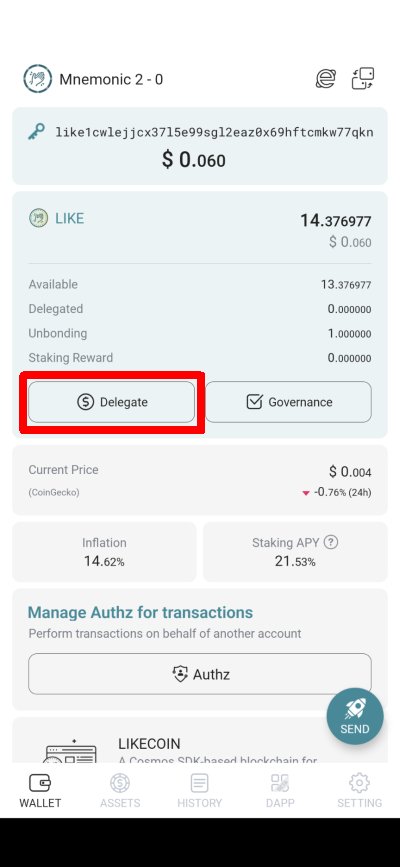
On the Cosmostation app, click on "Delegate".
Click "Delegate"
Step 2: Select the validator with delegation
On the "My" tab of the Validator List, click on the validator that you have delegated.
On the "My" tab of the Validator List, click on the validator that you have staked
Step 3: Redelegate
Click "REDELEGATE".
Click "REDELEGATE"
Step 4: Decide the amount to redelegate
The "REDELEGATE" page will appear, enter the amount of LikeCoin you want to redelegate and then click "Next"
Enter the amount of LikeCoin you want to redelegate and then click "Next"
Step5: Select the new validator to delegate
Select the validator that you want to redelegate to and click "Next" then confirm (Reference to Step 4-7 in Delegate via Cosmostation app ) to complete the redelegation.
Select the validator that you want to redelegate to and click "Next"
Redelegate via LikeCoin app
LikeCoin app "Redelegate" function helps users to transfer the delegated LikeCoin from one validator to another. LikeCoin will be transferred immediately after confirmation, voting power of the validator is affected too. The newly delegated LikeCoin receives rewards according to the rewards percentage of the new validator.
Steps for Redelegation:
Step 1: Select the validator with delegation
Click on the validator that you delegated (displayed as green) and click "Redelegate".
Click "Redelegate"
Step 2: Select the new validator to delegate
The app pops up a list of validators, select the validator to redelegate your LikeCoin.
Select the new validator to redelegate to
Step 3: Enter the amount of LikeCoin to redelegate
Enter the amount of LikeCoin that you would like to redelegate to the new validator, then click "Next".
Enter the amount of LikeCoin to redelegate, click "Next"
Step 4: Confirm redelegation
Details of redelegation are displayed, check them carefully, click "Confirm" and wait for the redelegation to complete, it usually takes a few seconds.
Click "Confirm" to redelegate
Step 4: Beware of cooling-off period
The transferred LikeCoin got a 21 days cooling-off period, they cannot be used in any way. Please note.
The transferred LikeCoin got a 21 days cooling-off period