# 以手機用 LIKE 購買 Writing NFT

{% hint style="warning" %}
此文檔只適用於 Liker Land 和 LikeCoin v2。如需了解 [3ook.com](http://3ook.com/) 和 LikeCoin v3，請至 [docs.3ook.com](http://docs.3ook.com/) 及 [dao.like.co](https://dao.like.co/)。
{% endhint %}

## 以手機瀏覽器收藏 Writing NFT <a href="#mobile" id="mobile"></a>

### 在 Keplr mobile 簽署

**步驟一**：登入 Keplr mobile 後到手機瀏覽器開啟希望購買的 NFT 頁面並點「立即收藏」、「收集」、「收藏作品」或當前價格開始收藏 Writing NFT。

<figure><img src="/files/whFqihWq5fZ3KnFYmb4f" alt=""><figcaption><p>點「立即收藏」</p></figcaption></figure>

**步驟二**：彈出收藏作品頁面，在「簽署留言給創作者」輸入給創作者的訊息（非必須）。輸入完成後又或者直接點「用 LIKE 購買」。

<figure><img src="/files/QTUq1ooJkkFtWYU1oQqJ" alt=""><figcaption><p>輸入給作者的話並用 LIKE 購買</p></figcaption></figure>

**步驟三**：彈出視窗選擇 Keplr mobile ，點擊並連接。

<figure><img src="/files/xjEDn7jhhSPDQg0qMiIX" alt=""><figcaption><p>彈出視窗選擇 Keplr mobile ，點擊並連接</p></figcaption></figure>

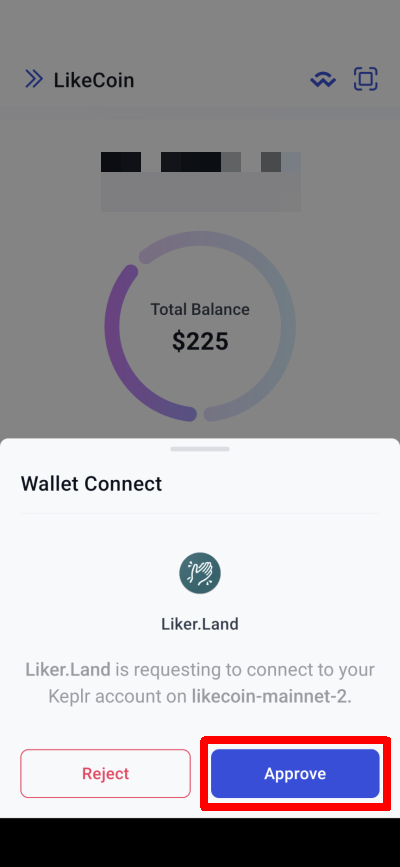
**步驟四**：在 Keplr mobile 彈出視窗，點「Approve」。

<figure><img src="/files/GmJeamZCBN6IFnDMNhEE" alt=""><figcaption><p>在 Keplr mobile 彈出視窗，點「Approve」</p></figcaption></figure>

**步驟五**：瀏覽器出現正在收藏作品頁面。

<figure><img src="/files/3JBZUKQ8dW3nfpwOTbqY" alt=""><figcaption><p>瀏覽器出現正在收藏作品頁面</p></figcaption></figure>

**步驟六**：回到 Keplr mobile ，點「Approve」。

<figure><img src="/files/JFSGpKnqtWwZTvwg5R7g" alt=""><figcaption><p>回到 Keplr mobile ，點「Approve」</p></figcaption></figure>

**步驟七**：回到瀏覽器後出現正在收藏作品頁面。

<figure><img src="/files/tgWx6auyp2bDYmDDi2xl" alt=""><figcaption><p>正預備運送作品</p></figcaption></figure>

**步驟八**：付款成功後可於[我的書架](/zh/archive/archive/liker-land/dashboard.md)，或點「檢視 NFT」檢視已購買的 NFT。

<figure><img src="/files/kKNRB2OgphVCixZgws8R" alt=""><figcaption><p>點「檢視 NFT」</p></figcaption></figure>

### 在 Cosmostation app 簽署 <a href="#cosmostation-app" id="cosmostation-app"></a>

#### 教學影片

{% embed url="<https://www.youtube.com/watch?v=l6zjetJVNuA>" %}

### 在 LikeCoin 手機應用程式簽署 <a href="#liker-land-app" id="liker-land-app"></a>

**步驟一**：登入 [LikeCoin 手機應用程式](/zh/general-guides/dapp/liker-land/download.md)後到手機瀏覽器開啟希望購買的 NFT 頁面並點「立即收藏」、「收集」、「收藏作品」或當前價格開始收藏 Writing NFT。

<figure><img src="/files/whFqihWq5fZ3KnFYmb4f" alt=""><figcaption><p>點「立即收藏」</p></figcaption></figure>

**步驟二**：彈出收藏作品頁面，在「簽署留言給創作者」輸入給創作者的訊息（非必須）。輸入完成後又或者直接點「用 LIKE 購買」。

<figure><img src="/files/QTUq1ooJkkFtWYU1oQqJ" alt=""><figcaption><p>輸入給作者的話並用 LIKE 購買</p></figcaption></figure>

**步驟三**：彈出視窗選擇 Liker ID，點擊並連接。

<figure><img src="/files/40G1PN8O5TJckZTzZDCC" alt=""><figcaption><p>彈出視窗選擇 Liker ID，點擊並連接</p></figcaption></figure>

**步驟四**：在 LikeCoin app 彈出 Liker Land 視窗，點「允許」。

<figure><img src="/files/OeAnV0vcIPKJzRVdWFcj" alt=""><figcaption><p>LikeCoin app 彈出視窗，點「允許」</p></figcaption></figure>

**步驟五**：出現即將回瀏覽器繼續，點「確認」並回到瀏覽器。

<figure><img src="/files/dVv2AZEtUpWxsU1iJKk3" alt=""><figcaption><p>出現即將回瀏覽器繼續，點「確認」回瀏覽器</p></figcaption></figure>

**步驟六**：瀏覽器出現正在收藏作品頁面。

<figure><img src="/files/7YMPWQsY8oBJbPIwU1h8" alt=""><figcaption><p>瀏覽器出現正在收藏作品頁面</p></figcaption></figure>

**步驟七**：回到 LikeCoin app，點「允許」。

<figure><img src="/files/UfNZRTlAfRVG4DSfv0SI" alt=""><figcaption><p>回到 LikeCoin app，點「允許」</p></figcaption></figure>

**步驟八**：再次出現即將回瀏覽器繼續，點「確認」並回到瀏覽器。

<figure><img src="/files/J1wV0Ai9ZB6eoYM9mAlq" alt=""><figcaption><p>出現即將回瀏覽器繼續，點「確認」</p></figcaption></figure>

**步驟九**：回到瀏覽器後出現正在收藏作品頁面。

<figure><img src="/files/8D4nynI1wI7SKSHM6WCC" alt=""><figcaption><p>瀏覽器出現正在收藏作品頁</p></figcaption></figure>

**步驟十**：付款成功後可於[我的書架](/zh/archive/archive/liker-land/dashboard.md)，或點「檢視 NFT」檢視已購買的 NFT。

<figure><img src="/files/XWDB6mYzQ2pOKdSjUSU5" alt=""><figcaption><p>點「檢視 NFT」</p></figcaption></figure>

{% hint style="warning" %}
如在購買過程中遇到問題，請到右下角設定點「Wallet Connet」刪除現有連結並再次購買。
{% endhint %}


---

# Agent Instructions: Querying This Documentation

If you need additional information that is not directly available in this page, you can query the documentation dynamically by asking a question.

Perform an HTTP GET request on the current page URL with the `ask` query parameter:

```
GET https://docs.v2.like.co/zh/depub/collect-writing-nft/collect-writing-nft-on-mobile.md?ask=<question>
```

The question should be specific, self-contained, and written in natural language.
The response will contain a direct answer to the question and relevant excerpts and sources from the documentation.

Use this mechanism when the answer is not explicitly present in the current page, you need clarification or additional context, or you want to retrieve related documentation sections.