# 以手機投票

{% hint style="warning" %}
此文檔只適用於 Liker Land 和 LikeCoin v2。如需了解 [3ook.com](http://3ook.com/) 和 LikeCoin v3，請至 [docs.3ook.com](http://docs.3ook.com/) 及 [dao.like.co](https://dao.like.co/)。
{% endhint %}

## 使用手機瀏覽器於 stake.like.co 投票 <a href="#delegate-via-dao.like.co" id="delegate-via-dao.like.co"></a>

使用手機瀏覽器可於 [stake.like.co](https://stake.like.co/welcome) 配合 [Authcore](/zh/depub/register.md) 投票，步驟與[以桌機於 stake.like.co 投票](/zh/general-guides/governance/direct-vote/on-desktop.md)相同。

## 使用 Keplr Mobile 投票

### 步驟一：委託 LikeCoin

投票前請確認已委託 [LikeCoin](https://like.co/) 予驗證人，委託給任何一個驗證人也是可以的。

{% content-ref url="/pages/-M-K\_hW6s4mrWDrtVCAr" %}
[委託 LikeCoin](/zh/general-guides/stake/delegation-of-likecoin.md)
{% endcontent-ref %}

### 步驟二：登入 Keplr Mobile

打開 [Keplr Mobile](/zh/general-guides/wallet/keplr-mobile.md)，點「Governance」。

<figure><img src="/files/VTuaLCwXQLRvt28NfQ1X" alt=""><figcaption><p>點「Governance」</p></figcaption></figure>

### 步驟三：選擇議案

選擇「VOTING PERIOD」正在投票的議案。你亦可以參看以往議案內容。

<figure><img src="/files/k1YXHQikV0gZBuVL0eao" alt=""><figcaption><p>選擇「VOTING PERIOD」正在投票的議案</p></figcaption></figure>

### 步驟四：開始投票

查看議案內容及投票狀態，並點「Vote」開始投票。

<figure><img src="/files/LSzwwZ1bMFqm3isYxDLD" alt=""><figcaption><p>點「Vote」開始投票</p></figcaption></figure>

### 步驟五：投票選項

出現 Yes（支持）、No（反對）、No with Veto（強烈反對）、Abstain（棄權）四個投票選項。選擇其中一項後點「Vote」。

<figure><img src="/files/vQLgt6vEHhckji2DYzpJ" alt=""><figcaption><p>選擇 Yes、No、No with Veto 或 Abstain 後點「Vote」</p></figcaption></figure>

### 步驟六：確認投票

留意投票需要[手續費](/zh/general-guides/wallet/transaction-fee.md)。查看一切無誤後，點「Approve」確認投票。

<figure><img src="/files/wLxdlIYPOQIzSRPAHJSx" alt=""><figcaption><p>點「Approve」確認投票</p></figcaption></figure>

## 使用 Cosmostation app 投票

### 步驟一：委託 LikeCoin

投票前請確認已委託 LikeCoin 予驗證人，委託給任何一個驗證人也是可以的。

{% content-ref url="/pages/-M-K\_hW6s4mrWDrtVCAr" %}
[委託 LikeCoin](/zh/general-guides/stake/delegation-of-likecoin.md)
{% endcontent-ref %}

### 步驟二：登入 Cosmostation app

打開 [Cosmostation app](/zh/general-guides/wallet/cosmostation-mobile.md)，點「Governance」。

<figure><img src="/files/esqq1bTPJVhNB7frbLzE" alt=""><figcaption><p>點「Governan託ce」</p></figcaption></figure>

### 步驟三：選擇議案

在「Voting Period Proposals」選擇正在投票的議案。你亦可以點「Proposals」參看以往議案內容。

<figure><img src="/files/iF5OVHGcRAFOM4n0HCrE" alt=""><figcaption><p>在「Voting Period Proposals」選擇正在投票的議案</p></figcaption></figure>

### 步驟四：開始投票

查看議案內容及投票狀態，並點「Vote」開始投票。

<figure><img src="/files/vsZ1O94xQgX9TbeRfAh7" alt=""><figcaption><p>點「Vote」</p></figcaption></figure>

### 步驟五：投票選項

出現 Yes（支持）、No（反對）、No with Veto（強烈反對）、Abstain（棄權）四個投票選項。選擇其中一項後點「Next」。

<figure><img src="/files/ge4UlZJrVX5yoTj8AUIw" alt=""><figcaption><p>選擇 Yes、No、No with Veto 或 Abstain 後點「Next」</p></figcaption></figure>

輸入 Memo（如有），點「Next」。

<figure><img src="/files/6QttxcxcJWgbiHwDvW1J" alt=""><figcaption><p>點「Next」</p></figcaption></figure>

### 步驟六：確認手續費

顯示[手續費](/zh/general-guides/wallet/transaction-fee.md)預估數值，點「Next」繼續。

<figure><img src="/files/A8sGCtQ9lgqXu3sA31hc" alt=""><figcaption><p>點「Next」</p></figcaption></figure>

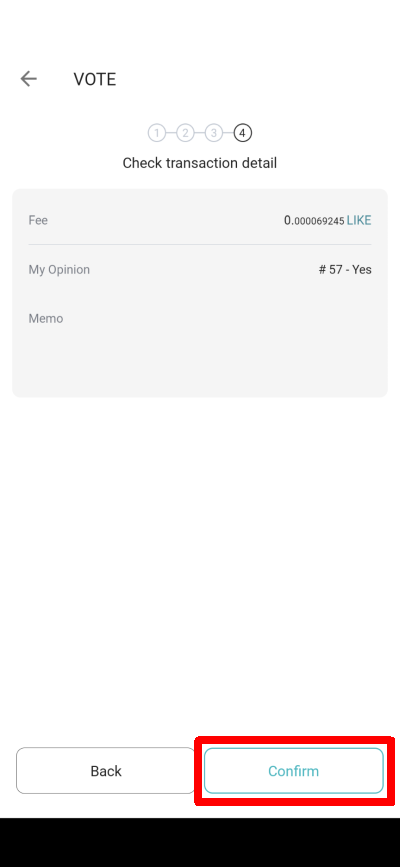
出現「Check transaction detail」，確認無誤後再點「Confirm」

<figure><img src="/files/cyNEj04BLbGd6BLeXOvf" alt=""><figcaption><p>點「Confirm」</p></figcaption></figure>

### 步驟七：PIN 碼確認

輸入 PIN 碼確認。

<figure><img src="/files/kD94Us3AI4VqGGkuqKiq" alt=""><figcaption><p>輸入 PIN 碼確認</p></figcaption></figure>

### 步驟八：查看投票

投票完成並顯示詳盡資料，完成後點「Done」結束。

<figure><img src="/files/8Yal7Kwz1K973JitjcNt" alt=""><figcaption><p>投票完成並顯示詳盡資料，點「Share」分享或「Explorer」查閱明細</p></figcaption></figure>


---

# Agent Instructions: Querying This Documentation

If you need additional information that is not directly available in this page, you can query the documentation dynamically by asking a question.

Perform an HTTP GET request on the current page URL with the `ask` query parameter:

```
GET https://docs.v2.like.co/zh/general-guides/governance/direct-vote/on-mobile.md?ask=<question>
```

The question should be specific, self-contained, and written in natural language.
The response will contain a direct answer to the question and relevant excerpts and sources from the documentation.

Use this mechanism when the answer is not explicitly present in the current page, you need clarification or additional context, or you want to retrieve related documentation sections.