# 以手機轉移委託

{% hint style="warning" %}
此文檔只適用於 Liker Land 和 LikeCoin v2。如需了解 [3ook.com](http://3ook.com/) 和 LikeCoin v3，請至 [docs.3ook.com](http://docs.3ook.com/) 及 [dao.like.co](https://dao.like.co/)。
{% endhint %}

## 使用手機瀏覽器於 stake.like.co 委託 LikeCoin <a href="#delegate-via-dao.like.co" id="delegate-via-dao.like.co"></a>

使用手機瀏覽器可於 [stake.like.co](https://stake.like.co/welcome) 配合 [Authcore](/zh/depub/register.md) 轉移委託，步驟與[以桌機於 stake.like.co 轉移委託 LikeCoin 相同](/zh/general-guides/stake/redelegation-of-likecoin/on-desktop.md)。

## 使用 Keplr Mobile 轉移委託 <a href="#redelegate-via-cosmostation-app" id="redelegate-via-cosmostation-app"></a>

### 步驟一：登入 Keplr Mobile

打開 [Keplr Mobile](/zh/general-guides/wallet/keplr-mobile.md)，點「Staking」。

<figure><img src="/files/eaHMjjhLZ8RE90nGVsJt" alt=""><figcaption><p>點「Staking」</p></figcaption></figure>

### 步驟二：選擇已委託的驗證人

在 My Staking 點選你已委託的驗證人。

<figure><img src="/files/e72mPZ0DlHBa5hDiabMz" alt=""><figcaption><p>在 My Staking 點選你已委託的驗證人</p></figcaption></figure>

### 步驟三：進行轉移委託

點「Switch Validator」。

<figure><img src="/files/LFNaIaYCI2niGkSBKhjN" alt=""><figcaption><p>點「Switch Validator」</p></figcaption></figure>

### 步驟四：選擇新的驗證人

在 All Active Validators 頁面點選轉移委託的新驗證人。

<figure><img src="/files/x4vzKAXqnYbOQovWoK2i" alt=""><figcaption><p>在 All Active Validators 頁面點選轉移委託的新驗證人</p></figcaption></figure>

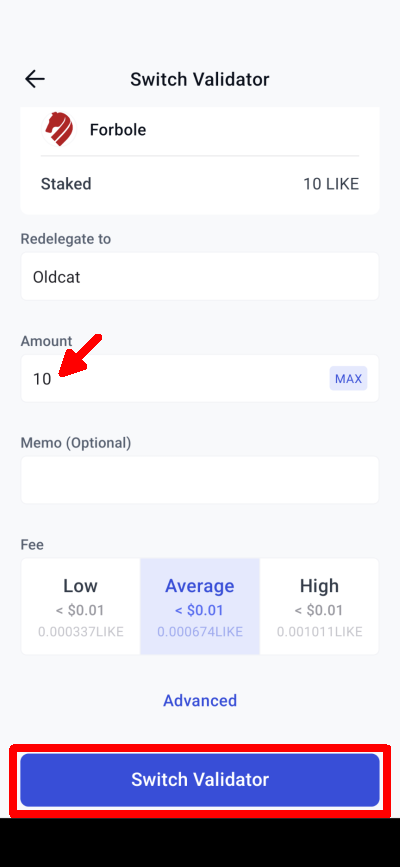
### 步驟五：輸入轉移委託金額

輸入你所需要轉移委託的 LikeCoin 數量，點「Switch Validator」。

<figure><img src="/files/g87U5EVMu4L4trAbpu3e" alt=""><figcaption><p>輸入你所需要轉移委託的 LikeCoin 數量，點「Switch Validator」</p></figcaption></figure>

### 步驟六：確認轉移

查看一切無誤後，點「Approve」確認轉移委託。

<figure><img src="/files/5ezGdg91Is0tqWbacQqC" alt=""><figcaption><p>點「Approve」確認轉移委託</p></figcaption></figure>

## 使用 Cosmostation app 轉移委託

### 步驟一：登入 Cosmostation app

打開 [Cosmostation app](/zh/general-guides/wallet/cosmostation-mobile.md)，點「Delegate」。

<figure><img src="/files/ox9fLCe0bg0vFa8smRi7" alt=""><figcaption><p>點「Delegate」</p></figcaption></figure>

### 步驟二：選擇已委託的驗證人

在 Validator List 的 「My」點選已委託了的驗證人。

<figure><img src="/files/mXu6SRHrGZHV8G6FcmNC" alt=""><figcaption><p>在 Validator List 的 「My」點選已委託了的驗證人</p></figcaption></figure>

### 步驟三：進行轉移委託

點「REDELEGATE」。

<figure><img src="/files/Xfbb6eOuZpCbpvY3t8ZE" alt=""><figcaption><p>點「REDELEGATE」</p></figcaption></figure>

### 步驟四：輸入轉移委託金額

出現 REDELEGATE 頁面，輸入你所需要轉移委託的 LikeCoin 數量，點「Next」。

<figure><img src="/files/QxpisLHjYQOgLcRB4Zgj" alt=""><figcaption><p>輸入需要轉移委託的 LikeCoin 數量，點「Next」</p></figcaption></figure>

### 步驟五：選擇新的驗證人

選擇需要轉移委託的新驗證人，點「Next」再進行確認（其他細節請參考[使用 Cosmostation app 委託 LikeCoin 步驟四至七](/zh/general-guides/stake/delegation-of-likecoin/on-mobile.md#delegate-via-cosmostation-app)）即可轉移委託。

<figure><img src="/files/y1yrQutE6IG0oXAdwW1p" alt=""><figcaption><p>選擇需要轉移委託的新驗證人，點「Next」確認</p></figcaption></figure>

## 使用 LikeCoin app 轉移委託 <a href="#redelegate-via-liker-land" id="redelegate-via-liker-land"></a>

[LikeCoin 手機應用程式](/zh/general-guides/dapp/liker-land/download.md)提供「轉移委託」功能，讓用戶把已委託給某位驗證人的 LikeCoin 轉移給另一位驗證人。轉移的 LikeCoin 金額在確認後即時轉帳，驗證人的投票權也會即時受影響。用戶已轉移的金額將按新驗證人提供的回報率獲取回報。

轉移委託的步驟如下：

### 步驟一：選擇已委託的驗證人

先從驗證人列表中選取欲取消委託的驗證人，已委託的驗證人在列表上呈綠色。點擊後進入驗證人畫面，在上方選項中點「轉移委託」。

<figure><img src="/files/XNJegSAkeagCW4l0pF4Y" alt=""><figcaption><p>點「轉移委託」</p></figcaption></figure>

### 步驟二：選擇新的驗證人

應用程式會彈出驗證人列表。請選取欲轉移 LikeCoin 至哪位驗證人。

<figure><img src="/files/cESw0Hatwxc9xnsOWT9Y" alt=""><figcaption><p>選擇轉移委託至新的驗證人</p></figcaption></figure>

### 步驟三：輸入轉移金額

輸入需要轉移的金額，點「下一步」確認。

<figure><img src="/files/Q06GzpYLn7SNkSV7bnp8" alt=""><figcaption><p>輸入需要轉移金額，點「下一步」</p></figcaption></figure>

### 步驟四：確認轉移

應用程式彈出轉移的細節，查核無誤後，點「確認」，並等待轉移過程完成，一般只花幾秒。

<figure><img src="/files/9jzKomj5umbkeOCAXnRj" alt=""><figcaption><p>點「確認」轉移委託</p></figcaption></figure>

### 步驟五：留意冷卻期

被轉移的金額會有 21 天的冷卻期，期間不能被動用，請注意。

<figure><img src="/files/cm4F2K5oEYvpPdHA978N" alt=""><figcaption><p>留意轉移委託有 21 天冷卻期</p></figcaption></figure>


---

# Agent Instructions: Querying This Documentation

If you need additional information that is not directly available in this page, you can query the documentation dynamically by asking a question.

Perform an HTTP GET request on the current page URL with the `ask` query parameter:

```
GET https://docs.v2.like.co/zh/general-guides/stake/redelegation-of-likecoin/on-mobile.md?ask=<question>
```

The question should be specific, self-contained, and written in natural language.
The response will contain a direct answer to the question and relevant excerpts and sources from the documentation.

Use this mechanism when the answer is not explicitly present in the current page, you need clarification or additional context, or you want to retrieve related documentation sections.