> For the complete documentation index, see [llms.txt](https://docs.v2.like.co/llms.txt). Markdown versions of documentation pages are available by appending `.md` to page URLs; this page is available as [Markdown](https://docs.v2.like.co/zh/general-guides/wallet/cosmostation-mobile/cosmostation-app-deposit-and-send-likecoin.md).

# Cosmostation app：存入及轉帳

{% hint style="warning" %}
此文檔只適用於 Liker Land 和 LikeCoin v2。如需了解 [3ook.com](http://3ook.com/) 和 LikeCoin v3，請至 [docs.3ook.com](http://docs.3ook.com/) 及 [dao.like.co](https://dao.like.co/)。
{% endhint %}

## 在 Cosmostation app 存入 LikeCoin

### 步驟一

打開 Cosmostation app，點錢包地址。

<figure><img src="/files/2pVHEDBhwRXhk46oCZcn" alt=""><figcaption><p>打開 Cosmostation app 點錢包地址</p></figcaption></figure>

### 步驟二

出現錢包地址及二維碼，直接使用 [LIKE Pay](/zh/general-guides/wallet/like-pay.md) 掃瞄二維碼就可以轉帳 LikeCoin 到你的 Cosmostation 錢包。點「Copy」可直接複製錢包地址並黏貼到所需要的地方（交易所或另一個錢包）。或者點「Share」分享。

<figure><img src="/files/AptjTCEeFqJTFqSMvM3y" alt=""><figcaption><p>使用 LIKE Pay 掃瞄二維碼轉帳 LikeCoin 到你的錢包</p></figcaption></figure>

### 步驟三

「Share QR Image」可將錢包二維碼變成相片方便分享；「Share Text」可直接分享錢包地址予指定對象。

<figure><img src="/files/Qo7JjAk7kMzoC6B3JecF" alt=""><figcaption><p>「Share QR Image」或「Share Text」分享錢包明細</p></figcaption></figure>

## 使用 Cosmostation app 轉帳 LikeCoin 到其他錢包

### 步驟一

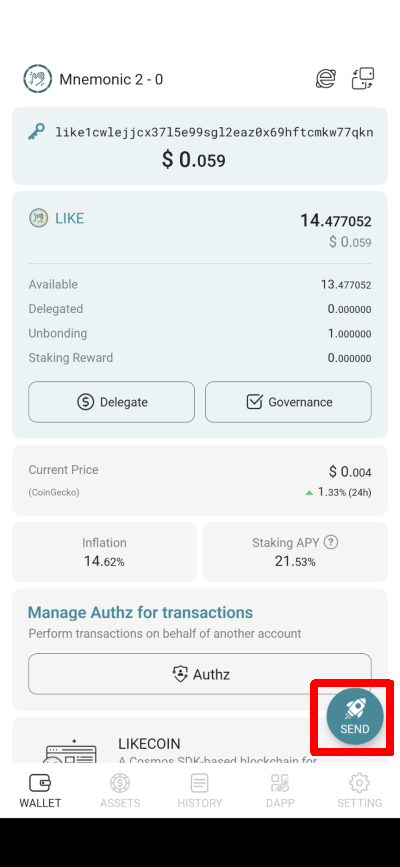
在 Cosmostation app 點「Send」。

<figure><img src="/files/eUJ3fhcPUYdIQsMz2dWA" alt=""><figcaption><p>在 Cosmostation app 點「Send」</p></figcaption></figure>

### 步驟二

輸入收款錢包地址。可點「Wallet」出現 Cosmostation app 中另一錢包地址、點「Scan」掃瞄錢包二維碼或點「Paste」填寫已複製的錢包地址。完成後點「Next」。

<figure><img src="/files/yfiySwkFDuQisH34taZm" alt=""><figcaption><p>輸入收款錢包地址後點「Next」</p></figcaption></figure>

### 步驟三

輸入需要轉帳的 LikeCoin 數量並留意必須預留[手續費](/zh/general-guides/wallet/transaction-fee.md)後點「Next」。

<figure><img src="/files/frQbauxBt736JFVgck3V" alt=""><figcaption><p>輸入需要轉帳的 LikeCoin 數量點「Next」</p></figcaption></figure>

### 步驟四

Insert memo (option) 填進收款方需要 Tag/Memo（如有）再點「Next」。

<figure><img src="/files/KtLSchcnxu84zjJq5iou" alt=""><figcaption><p>填寫 Tag/Memo（如有）再點「Next」</p></figcaption></figure>

### 步驟五

顯示[手續費](/zh/general-guides/wallet/transaction-fee.md)預估數值，點「Next」繼續。

<figure><img src="/files/btWZnPiBR2LlH7D4vRAj" alt=""><figcaption><p>點「Next」</p></figcaption></figure>

### 步驟六

最後確認轉帳數量、[手續費](/zh/general-guides/wallet/transaction-fee.md)、現有 LikeCoin，傳送後剩下 LikeCoin 數量及收款他地址再點「Confirm」。

<figure><img src="/files/9wgsTFc3fK4b0t8iZXZB" alt=""><figcaption><p>確認轉帳，點「Confirm」</p></figcaption></figure>

### 步驟七

輸入 PIN 碼確認。

<figure><img src="/files/kD94Us3AI4VqGGkuqKiq" alt=""><figcaption><p>輸入 PIN 碼確認</p></figcaption></figure>

### 步驟八

轉帳完成並顯示詳盡資料，完成後點「Done」結束。

<figure><img src="/files/tWPHkHrb97MQo3u93bdb" alt=""><figcaption><p>轉帳完成並顯示詳盡資料</p></figcaption></figure>


---

# Agent Instructions
This documentation is published with GitBook. GitBook is the documentation platform designed so that both humans and AI agents can read, navigate, and reason over technical content effectively. Learn more at gitbook.com.

## Querying This Documentation
If you need additional information that is not directly available in this page, you can query the documentation dynamically by asking a question.

Perform an HTTP GET request on the current page URL with the `ask` query parameter, and the optional `goal` query parameter:

```
GET https://docs.v2.like.co/zh/general-guides/wallet/cosmostation-mobile/cosmostation-app-deposit-and-send-likecoin.md?ask=<question>&goal=<endgoal>
```

`ask` is the immediate question: it should be specific, self-contained, and written in natural language.
`goal` is optional and describes the broader end goal you are ultimately trying to accomplish on behalf of the user. GitBook uses it to tailor the answer towards what is most useful for that goal.

The response will contain a direct answer to the question and relevant excerpts and sources from the documentation.

Use this mechanism when the answer is not explicitly present in the current page, you need clarification or additional context, or you want to retrieve related documentation sections.